
How many times have you had to look up the syntax to read a CSV into a PySpark dataframe? And how many times have you found that half your team uses spark.read.csv(...) while the rest are using spark.read.format("csv").load(...)?
It doesn’t look like a big deal, but this kind of inconsistency adds up. It makes codebases messy, slows people down, and chips away at clean engineering practices.
This is where Python wheels come in. A wheel lets you package your own tested helper functions into a single file that everyone in the team can use, no matter which notebook, pipeline, or Fabric workspace they’re working in.
In this blog, I’m going to walk through:
- what a Python wheel actually is
- how to build one
- how to upload it to a custom environment in Microsoft Fabric so your clusters automatically inherit those functions.
What is a Python Wheel?
A Python wheel is simply a custom library you build yourself. The output is a .whl file that you can install into any environment – local, Databricks, Fabric, whatever – and instantly reuse the same functions everywhere.
They’re incredibly useful for Data Engineering teams who want to centralise common logic instead of having five slightly different versions of the same helper function scattered across repos.
This is all part of better engineering and better governance. If every project uses its own version of “read this file” or “merge this table”, you eventually end up with maintenance debt and inconsistent behaviour across the platform.
Personally, I keep a wheel with a bunch of I/O helpers like read_from_csv, write_to_table, and merge_to_table. They’re tested, documented and version-controlled, and I can use them in every Fabric project without rewriting the same code again and again.
How to Build a Python Wheel
Let’s get into how to build a Python wheel. I am assuming that if you have got this far I don’t need to explain how to build the custom functions and unit tests, or how to create a Git repo/project and commit to it.
- Create your project structure locally. This is up to personal preference, but something such as this screenshot, with a
__init__.pyfile, anio_spark.pyfile containing your functions, and atest_io_spark.pyfile to store your tests.
Populate the functions and tests here.
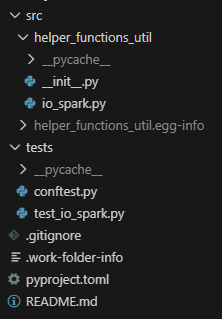
2. Inside the __init__.py file, expose the helper function(s).
from .io_spark import (
    list_tables,
    merge_to_table,
    optimise_table,
    read_from_csv,
    read_from_excel,
    read_from_json,
    read_from_table,
    write_to_table,
)

__all__ = [
    "write_to_table",
    "merge_to_table",
    "read_from_csv",
    "read_from_json",
    "read_from_excel",
    "read_from_table",
    "list_tables",
    "optimise_table",
]
3. Create the pyproject.toml file to set up the project. Keep this updated every time you amend the functions!
[build-system]
requires = ["setuptools>=65", "wheel", "build"]
build-backend = "setuptools.build_meta"

[project]
name = "helper_functions_util"
version = "0.0.1"
description = "Shared PySpark helper utilities for Fabric projects"
readme = "README.md"
requires-python = ">=3.10"
authors = [
  { name = "Ben Wolfenden" }
]

dependencies = [
  "pyspark>=3.5.0",
  "delta-spark>=3.1.0",
]

[project.optional-dependencies]
dev = [
  "pytest>=7.0.0",
]

[tool.setuptools.packages.find]
where = ["src"]
4. Build the wheel. From the project root:
python -m buildThis produces the following files, which is your wheel!
dist/
    helper_functions_utils-0.0.1-py3-none-any.whl
    helper_functions_utils-0.0.1.tar.gz
5. Test locally.
python -m venv venv
source venv/bin/activate
pip install dist/helper_functions_utils-0.0.1-py3-none-any.whl

from helper_functions_util import read_from_table....
6. Add Source Control, productionise and automate according to your organisation’s CI/CD pattern (think your build.yml file for GitHub Actions). You can add the following to a .gitignore.
venv/
__pycache__/
*.pyc
dist/
*.egg-info/
You now have a productionised Python wheel that you can use wherever you want!
Now I will show you how to use it specifically inside Fabric using a custom environment.
Custom Environments in Fabric
Custom environments in Fabric let you take control of how your Spark sessions run. Instead of relying on the workspace default environment, you can set your own libraries, your own Spark configuration and your own runtime settings, then reuse that across notebooks, jobs or entire workspaces.
The default environment is fine for most workloads and it attaches to a cluster quickly, usually in under ten seconds. But the moment you want to use your own libraries or tweak how Spark behaves, a custom environment becomes worth the extra startup time. It takes three to four minutes for the cluster to spin up, but once it’s ready, everything in your pipeline can reuse it.
If you run a pipeline of notebooks with high concurrency switched on, you only pay this three‑to‑four‑minute cost once at the start. After that, every notebook shares the same custom settings without any extra waiting.
In a world where serverless services take more control away from engineers, custom environments are one of the few places you can still tune the compute and shape how your workloads run.
You can use custom environments to:
- Upload and use your own libraries, including Python wheels.
- Choose a Spark runtime version. Spark 2.0 is in preview right now.
- Install non‑standard libraries like xgboost without adding
%pip installto every notebook. - Adjust runtime settings such as executor counts and node sizes.
- Set Spark properties like
spark.sql.shuffle.partitionsorspark.network.timeoutso every notebook behaves the same.
Using Custom Environments in Practice
Now you have built a Python wheel, how do you actually use it?
- Create a custom environment artefact in Fabric.
- Navigate to the ‘Custom’ tab under ‘Libraries’
- Upload your .whl function
- Publish the custom environment – note this can take around 15 minutes! Your custom environment is all set up to use now!
In a notebook, you can now attach the custom environment and replace the workspace default.

In a cell, you can import your functions to be used just like normal!
from helper_functions_util import write_to_table, read_from_tableSummary
Bringing Python wheels and Microsoft Fabric custom environments together gives you a powerful, disciplined way to build data products that scale. Wheels let you package your PySpark helpers, shared business logic, and transformation utilities into reproducible, versioned artifacts. Custom environments then give you a controlled place to run them, ensuring every notebook, pipeline, and job uses the same runtime, the same dependencies, and the same compute configuration.
Instead of one‑off installs, inconsistent libraries, or “it works on my machine” issues, you move to clean engineering workflow: develop locally, package with a wheel, test in CI, publish, and attach the environment to your Fabric workloads. That shift brings reliability, repeatability, and proper DataOps discipline into your Lakehouse.
If you’re trying to create a stable platform, reduce surprise failures, and enable teams to collaborate without stepping on each other’s toes, wheels and custom environments are a simple but transformative combination. They’re the backbone of clean working practices in Fabric and one of the easiest wins you can adopt on your data engineering journey.
BW